📰 Newspapers

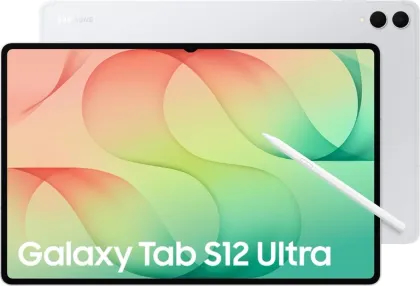
Samsung Galaxy Tab S12 vs Tab S11: Five Reasons You Should Make the Upgrade

Samsung Galaxy Tab S12 vs Tab S11: Five Reasons You Should Make the Upgrade

Samsung’s Galaxy Tab S11 is still one of the most capable Android tablets available, offering strong performance, a premium display and enough productivity features to handle everyday work. But with the arrival of the Galaxy Tab S12 series, existing users now face a familiar question: is the newer model worth the extra money?

The answer depends on what you use your tablet for.

Samsung has focused on improving processing power, artificial intelligence (AI) and creative productivity rather than making major changes to the tablet’s design. The Galaxy Tab S12 series introduces the MediaTek Dimensity 9500 processor, expanded Galaxy AI features and improved cooling, making it particularly attractive to professionals, content creators and users who regularly run demanding applications.

However, not every improvement represents a compelling reason to upgrade, especially if your Galaxy Tab S11 is already meeting your needs.

The biggest difference between the Galaxy Tab S11 and Galaxy Tab S12 is processing power.

The Galaxy Tab S11 series uses MediaTek’s Dimensity 9400+ processor, while the Galaxy Tab S12 series moves to the newer Dimensity 9500. According to Samsung, the Galaxy Tab S12 Ultra delivers up to 19 per cent faster CPU performance, 17 per cent better graphics performance and a 61 per cent improvement in AI processing.

In brief

Samsung’s Galaxy Tab S11 is still one of the most capable Android tablets available, offering strong performance, a premium display and enough productivity features to handle everyday work. The biggest difference between the Galaxy Tab S11 and Galaxy Tab S12 is processing power. The Galaxy Tab S11 series uses MediaTek’s Dimensity 9400+ processor, while the Galaxy Tab S12 series moves to the newer Dimensity 9500.

This is the opening of the story, shared with credit to News Trends KE. The rest of the report — with every detail — continues on the publisher’s website.

Continue reading at News Trends KE ↗

Cookie settings

Choose which cookies we may use. You can change this at any time from Cookie settings in the footer. Details of each cookie are in the Cookie Policy.

Strictly necessary

Needed for sign-in, security, payments and remembering these choices. Always on.

Preferences

Remember settings such as dark mode.

Analytics & performance

Help us count visits, understand which pages, devices and countries our readers use, and measure how well the site performs – anonymous and aggregated.

Advertising & marketing

Lets advertising partners show and personalise adverts, measure impressions, clicks and visits, prevent ad fraud and pay us – this is how the free site is funded.

🔔 News notifications

Get headlines from NewsHub on this device — even when the site is closed.

You can switch this off at any time. Works on Android, Windows, Mac and Linux browsers; on iPhone/iPad add the site to your Home Screen first.