📰 Newspapers

What the circled "Z" on Google Maps means

What the circled "Z" on Google Maps means

If you've seen a circled capital Z on your Google Maps route, you should know what it means. It might save you from a ticket.

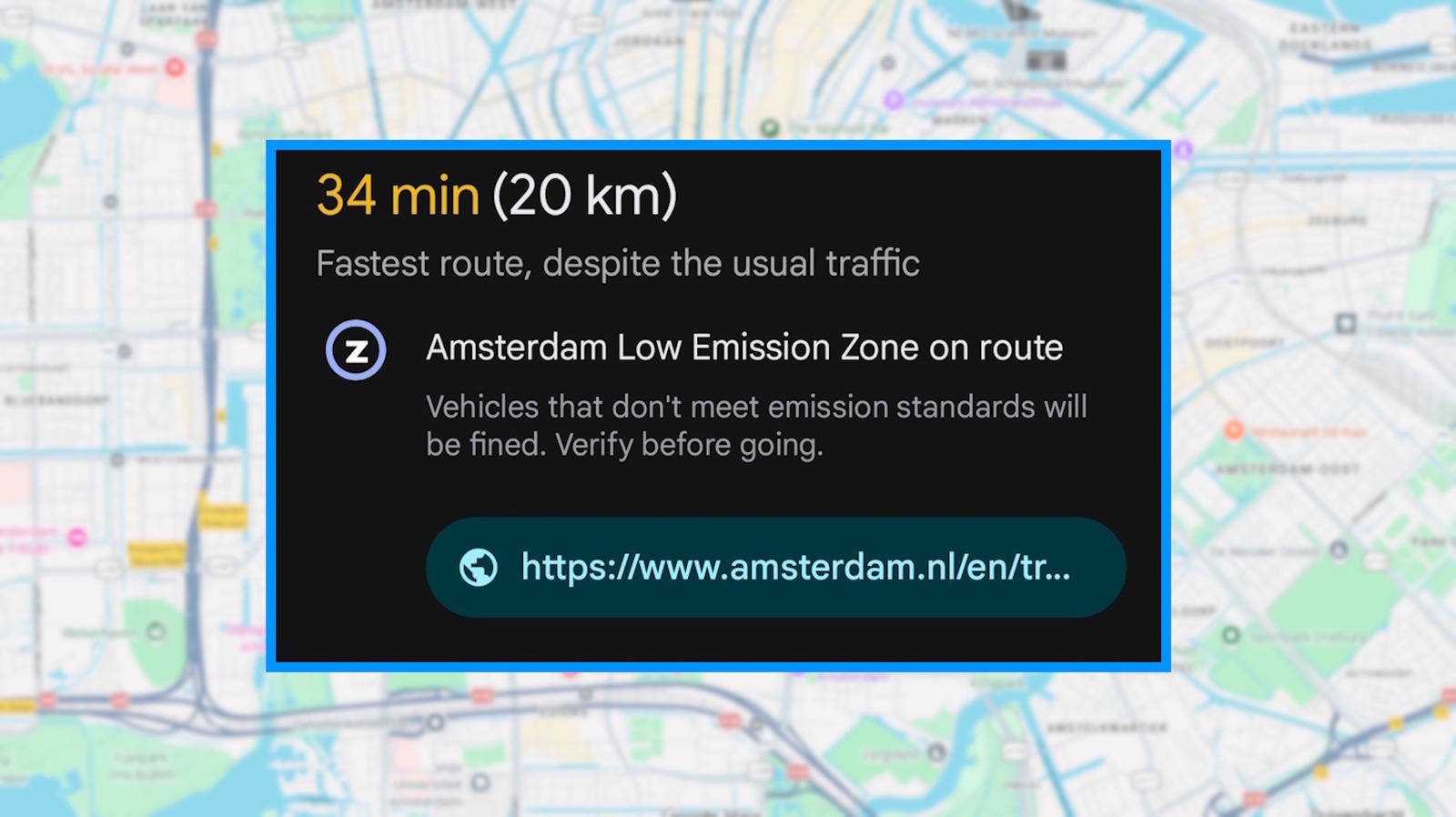
If you have had the chance to drive around Europe lately while using Google Maps, you might have noticed a small "Z" icon in your route details. Some drivers noticed this icon popping up in their route information and went online to ask what it represents. Well, it's not a zebra crossing icon, sadly, and it does not stand for "sleep mode," either. Google Maps is just warning you that your route is going through a low-emission zone.

More than 2 billion people use Google Maps every month to navigate around the globe. But with so many different countries having their own separate rules regarding driving, it's no wonder people are encountering icons that are completely new to them. Disregarding this icon, however, could bring with it a fine, so do not ignore it.

The "Z" marks a low-emission zone (LEZ) on your route. When planning a drive into the center of Amsterdam, for example, the icon appears under the trip time, right next to the line "Amsterdam Low Emission Zone on route." The app warns that vehicles that don't meet the emission standards will be fined, tells drivers to check if their car meets those standards and adds a link to the city's official page.


In brief

If you have had the chance to drive around Europe lately while using Google Maps, you might have noticed a small "Z" icon in your route details. Google Maps is just warning you that your route is going through a low-emission zone. More than 2 billion people use Google Maps every month to navigate around the globe. The "Z" marks a low-emission zone (LEZ) on your route.

This is the opening of the story, shared with credit to Engadget. The rest of the report — with every detail — continues on the publisher’s website.

Continue reading at Engadget ↗

Cookie settings

Choose which cookies we may use. You can change this at any time from Cookie settings in the footer. Details of each cookie are in the Cookie Policy.

Strictly necessary

Needed for sign-in, security, payments and remembering these choices. Always on.

Preferences

Remember settings such as dark mode.

Analytics & performance

Help us count visits, understand which pages, devices and countries our readers use, and measure how well the site performs – anonymous and aggregated.

Advertising & marketing

Lets advertising partners show and personalise adverts, measure impressions, clicks and visits, prevent ad fraud and pay us – this is how the free site is funded.

🔔 News notifications

Get headlines from NewsHub on this device — even when the site is closed.

You can switch this off at any time. Works on Android, Windows, Mac and Linux browsers; on iPhone/iPad add the site to your Home Screen first.