📰 Newspapers

One terminal command gave my forgotten Android device a desk job

One terminal command gave my forgotten Android device a desk job

The free, open source PhoneBox dashboard puts old Android screens back to work.

My kitchen junk drawer used to hold takeout menus and coupons, but it has since become a storage spot for old tablets or phones. Like me, you probably have a few devices lying around that are perfectly functional, but might not meet your daily driving needs. It's tucked away out of view, meant to live out the rest of its life in a drawer before finally being cleaned out and donated the next time someone opens the drawer and asks why you're holding on to outdated, unused devices. Thankfully, PhoneBox has a solution. You weren't hoarding old tech; you were waiting for the proper use.

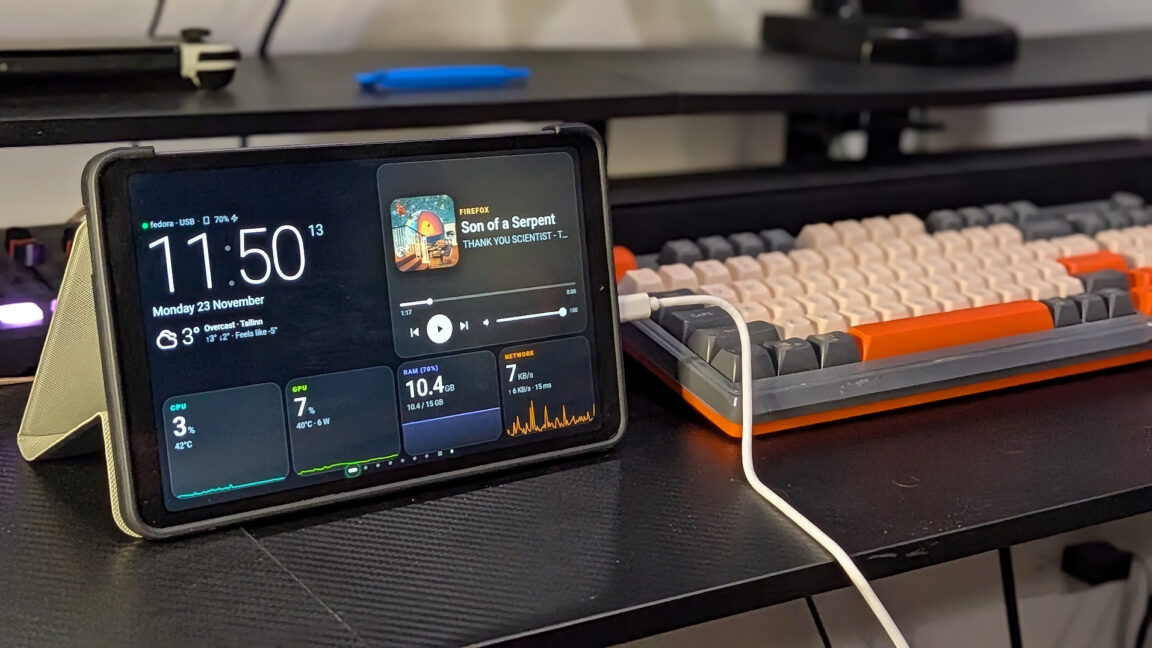
The PhoneBox home screen displays useful stats and what's currently playing in your browser. Credit: Nick Indge

I had an old AllDoCube iPlay 50 mini Pro 8.4-inch tablet that seemed like the perfect candidate. I bought the tablet second-hand as a possible big-screen gaming and emulation tablet to use with a telescopic control deck, but I quickly found I vastly preferred just using a dedicated device. Since that realization, this decent little unit has lived its life like so many other forgotten devices in a drawer.

Launch applications on your PC from the connected Android device. Credit: Nick Indge

Installation is a doddle

In brief

My kitchen junk drawer used to hold takeout menus and coupons, but it has since become a storage spot for old tablets or phones. The PhoneBox home screen displays useful stats and what's currently playing in your browser. Since that realization, this decent little unit has lived its life like so many other forgotten devices in a drawer. Launch applications on your PC from the connected Android device.

This is the opening of the story, shared with credit to Ars Technica. The rest of the report — with every detail — continues on the publisher’s website.

Continue reading at Ars Technica ↗

Cookie settings

Choose which cookies we may use. You can change this at any time from Cookie settings in the footer. Details of each cookie are in the Cookie Policy.

Strictly necessary

Needed for sign-in, security, payments and remembering these choices. Always on.

Preferences

Remember settings such as dark mode.

Analytics & performance

Help us count visits, understand which pages, devices and countries our readers use, and measure how well the site performs – anonymous and aggregated.

Advertising & marketing

Lets advertising partners show and personalise adverts, measure impressions, clicks and visits, prevent ad fraud and pay us – this is how the free site is funded.

🔔 News notifications

Get headlines from NewsHub on this device — even when the site is closed.

You can switch this off at any time. Works on Android, Windows, Mac and Linux browsers; on iPhone/iPad add the site to your Home Screen first.