📰 Newspapers

X is adding its first-ever parental controls

X is adding its first-ever parental controls

X (and Twitter before it) have never really had real parental controls. Until now.

Any responsible adult should probably check on their teen's X usage.

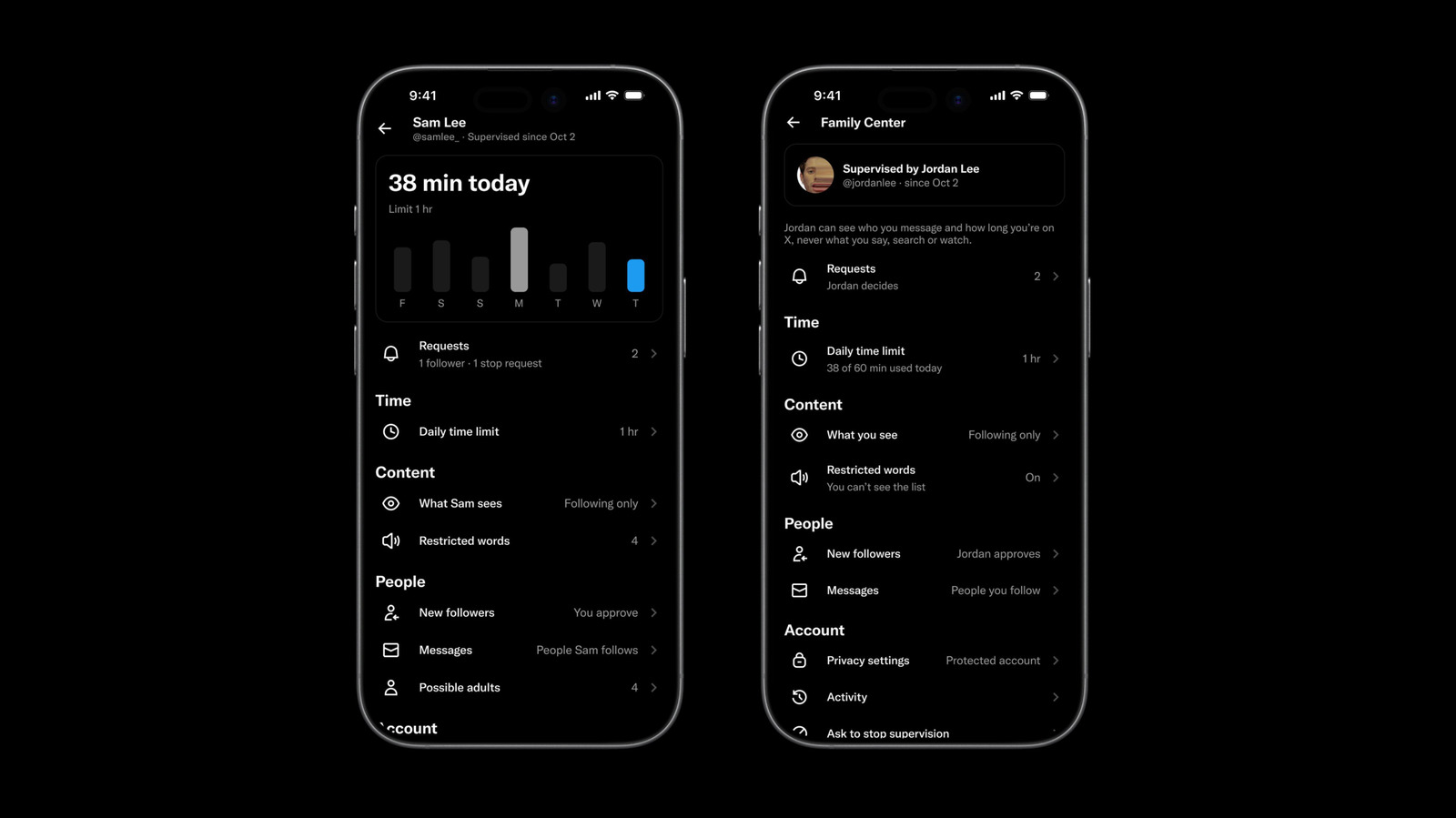
Elon Musk's X has finally introduced parental controls for kids aged 13 to 17, allowing parents and guardians to manage their teen's experience on the platform. Teens' accounts will now default to protected mode, with sensitive media restricted and targeted advertising blocked. The new settings will also give families "additional tools on top of those defaults," the platform announced.

Those extra tools let adults in charge of teens see how much time their kids have spent on X and set a daily limit, require approval for new followers, and limit For You recommendations to accounts the teen already follows. They can also filter specific words, turn off sensitive media content, allow parents to control who can send direct messages, and see which accounts their teen has chatted with one-on-one (without seeing the messages themselves).

To use the new parental controls, follow the guide in X's help center. "Linking starts with the parent or guardian and finishes with the teen. Both users have to agree," the platform states.

X emphasized that the new controls let parents manage content without prying into their kids' lives. "Parents and guardians cannot read private messages, see searches or viewing history, post as their teen, or access the account," the company wrote.


In brief

Any responsible adult should probably check on their teen's X usage. Elon Musk's X has finally introduced parental controls for kids aged 13 to 17, allowing parents and guardians to manage their teen's experience on the platform. X emphasized that the new controls let parents manage content without prying into their kids' lives. "Parents and guardians cannot read private messages, see searches or viewing history, post as their teen, or access the account," the company wrote.

This is the opening of the story, shared with credit to Engadget. The rest of the report — with every detail — continues on the publisher’s website.

Continue reading at Engadget ↗

Cookie settings

Choose which cookies we may use. You can change this at any time from Cookie settings in the footer. Details of each cookie are in the Cookie Policy.

Strictly necessary

Needed for sign-in, security, payments and remembering these choices. Always on.

Preferences

Remember settings such as dark mode.

Analytics & performance

Help us count visits, understand which pages, devices and countries our readers use, and measure how well the site performs – anonymous and aggregated.

Advertising & marketing

Lets advertising partners show and personalise adverts, measure impressions, clicks and visits, prevent ad fraud and pay us – this is how the free site is funded.

🔔 News notifications

Get headlines from NewsHub on this device — even when the site is closed.

You can switch this off at any time. Works on Android, Windows, Mac and Linux browsers; on iPhone/iPad add the site to your Home Screen first.